

Building an Agent-Friendly, Local-First Analytics Stack with MotherDuck and Rill


Imagine going from a 100-million-row dataset to an interactive analytics app with just a few prompts. What used to take hours or days can now be done in minutes by combining local-first databases and BI tools with an agentic coding workflow.
When Rill bet on YAML dashboards and CLI-first workflows in 2022, they weren't thinking about AI agents. Neither was MotherDuck when they built serverless DuckDB around the thesis that most data fits on a laptop. But it turns out, what is developer-friendly is also agent-friendly, with the needs of readable code, fast engines, and deterministic semantics.
Times are shifting rapidly toward CLI-first development. You know that's true when even email and calendar get their own Google CLIs. So why not have CLIs for your business metrics too?
This is what Rill and MotherDuck provide, including excellent developer workflows with a local-and-CLI-first approach, focusing on a developer-friendly interface and empowering users. Both work great on local laptops but can easily scale to the cloud, backed by a serverless data warehouse..
The convergence of embedded analytics engines (DuckDB/MotherDuck), declarative BI-as-code (Rill), and AI agent protocols (MCP) is creating a new architecture for business intelligence, one where dashboards become code, code becomes agent-readable, and analysts shift from clicking to prompting. And with 75% of cloud data warehouse queries scanning less than 1 GB[1], this opportunity is great for agentic BI. In this article, we look at how we build agentic-friendly and local-first analytic stacks with MotherDuck, Rill, and agents.
End to end examples later in the article
Later in the article we go through three different examples of how this can work, including GitHub repos and code examples, if that is something that's of interest to you.
Why These Two Tools?
Let's start with why do we use MotherDuck and Rill for agentic-first data tasks? As Ghanshyam Chodavadiya from SWYM says:
Quote on why SWYM use Rill with MotherDuck for their AI-native media decision platform:
[..] Rill lets us encode business context directly into our BI layer. Combined with MotherDuck and the Rill MCP client, it gives us flexible data control while powering automatically generated client dashboards and AI-driven insights.
Both MotherDuck and Rill use a sophisticated architecture that focuses on developer workflows and scales from local development with declarative configuration to cloud (e.g. with rill deploy, or md: instead of md) or even embeds into your data CI/CD or agents pipeline, very easily. All of these reasons make them suitable for modern data requirements, where we need to iterate quickly but still have a strong foundation.
Local-first Approach with DuckDB
Both tools start from a local-first approach with DuckDB as the foundation.
For example, the Local-First principle, that was tackled by Ink & Switch and its community compares different strengths of local workflows meant for files, but also applies to data workloads. Even more so with AI agents, which can read the context from these projects and enhance easily with the use of strong CLIs that are available on the command line.
Or reading the Small Data Manifesto by MotherDuck that says "Think small, develop locally, ship joyfully". If you enjoy some of these principles, this data stack with DuckDB/MotherDuck as the warehouse or real-time analytics storage and Rill as an interactive, fast, and beautiful BI tool will suit you well.
MotherDuck works seamlessly through the DuckDB CLI, whether it is to connect through their serverless database in the cloud (connect with duckdb ':md') or to open a fully fledged notebook environment locally with duckdb --ui (try it).
With Rill's YAML-based dashboard and metrics layer, and a powerful CLI, you can transform any of your data into a blazingly fast dashboard locally (run rill start), or from anywhere with the data on MotherDuck. Let's explore both in more detail, and show how users use it, and provide an example for you to get your hands on.
What Is MotherDuck?
Before we go into the hands-on examples, let's answer the question of what MotherDuck and Rill are. And what's the difference from DuckDB and what do they bring to the table?
In its essence, it's a DuckDB-powered cloud data warehouse that scales to terabytes with ease. Just as Turso hosts SQLite, MotherDuck hosts DuckDB in the cloud, serverless for you. MotherDuck has great relation to DuckDB Labs, the company behind DuckDB and the DuckDB Foundation.
MotherDuck integrates well with DuckDB, but you can also just run DuckDB locally without it and manage your server yourself, open some ports, make it scale automatically if more queries come. But you'd need to create an orchestration that scales out, handles OOM, servers, etc. So instead, MotherDuck provides all of it with simply pointing your local database to connect via ATTACH 'md:' compared to directly reading from a local DuckDB database (duckdb path/to/file/db.duckdb) or parquet files (FROM nyc.parquet or FROM read_parquet('test.not-ending-with-parquet')) that only you have access to.
The simplest way is to initially upload data to MotherDuck once, and then have access to the data from anywhere (see example later in the article).
How to Upload data to MotherDuck from Local Storage
You can basically use different ways of synchronizing local DuckDB to MotherDuck via COPY FROM DATABASE, CREATE OR REPLACE DATABASE ... FROM '<path>', from Parquet files, to using Python files - you can find more details at sync-duckdb-to-motherduck.
Besides simply replacing local DuckDB with a data warehouse like MotherDuck, MotherDuck has implemented a specific architecture called dual execution. It's built on top of their 1.5-Tier Architecture. It's a novel 1.5-tier architecture powered by WebAssembly (Wasm). Unlike the more traditional 3-Tier architecture that operates between the client and server, the 1.5-tier directly returns the request in the client (browser), reducing latency for server requests and network round trips.


Traditional applications are built on a 3-Tier Architecture, which requires several intermediary operations to run between the end user interface, server, and underlying database. MotherDuck’s 1.5-tier architecture has the same DuckDB engine running inside the user’s web browser and in the cloud.
The developers can move data closer to the user to create analytics experiences that run instantly with the benefit of still scaling with MotherDuck as the backend. Check their CIDR paper on DuckDB in the cloud and in the client, on how this works in detail.
What Does the Dual Execution Do?
Since the initial paper, the dual execution has evolved and makes MotherDuck more than just "DuckDB in the cloud". When you ATTACH 'md:' locally or in the web, you get a two-node distributed system that automatically routes query stages to wherever they run best.
An example with using dbt: In your sources.yml of dbt you can simply define dev with DuckDB and prod with MotherDuck like this:
your-project:
	target: prod
	outputs:
		dev:
			type: duckdb
			schema: project_dev
			path: "path/locally.duckdb"
			thread: 1
		...
		prod:
			type: duckdb
			schema: project
			path: "md:prod_project"
			thread: 1
		...
Smaller data gets processed locally with millisecond response times and if needed, can extend to run in the cloud, using cross-environment joins that transfer only the necessary intermediate results. As a user, you won't notice the difference in using simple DuckDB.
This uses your laptop's power with DuckDB as a first-class compute node. As MotherDuck CEO Jordan Tigani put it: "Laptops these days are extremely powerful and you can get answers in a handful of milliseconds, whereas if you had to ask a cloud service, the initial request wouldn't have even gotten there."
In a way, MotherDuck is a lightweight alternative to Spark for single-node or moderately-sized analytical workloads (it does not support distributed, multi-node processing on massive datasets), but it's far easier to set up, has no cluster management, and scales to terabytes. Without the setup cost or the operational burden for tasks that don't need the massive scale Spark provides, you get an out-of-the-box data warehouse that handles scale very conveniently for us users.
One more advantage is multi-user collaboration
DuckDB is single-writer, and MotherDuck is what unlocks the "multiplayer" angle with its integrated notebooks (which are also available locally with duckdb --ui, but not shareable on the web).
Why Rill?
So what does Rill bring to the table, and why do they work so well with MotherDuck?
If MotherDuck gives you a data warehouse that feels like a local database, Rill gives you a BI tool that feels like a code editor getting you up and running with a single binary you can start with. The name Rill is from an old English word and meaning "stream", and it has strong templates integrated that scaffold any BI requirements in seconds. Both MotherDuck and Rill are built on the conviction that focusing on developer experience will help data teams implement great data solutions that not only work, but are fun.
Rill's core idea is simple: define your entire BI stack (data sources, SQL models, metrics (total_revenue: sum(amount)), dashboards) as YAML and SQL files in a Git repository. Start simply with one command (curl https://rill.sh | sh), run rill start, and you have a local development environment backed by an embedded DuckDB instance delivering sub-second queries. Push to Git, deploy to Rill Cloud, and your dashboards are live. The same declarative files, the same SQL, the same metrics, just a different runtime.
A quick video of showcasing Rill's BI-as-Code power and how Claude Code can be used to collaborate with your BI tools, easily.
Moreover, this "BI-as-Code" approach turns out to be exactly what makes Rill a natural companion for agentic workflows, because all artifacts for data and BI are defined declaratively and locally, any agent can use them for context and build autonomously on top, while still letting the user verify that everything is correct and works by quickly running the Rill CLI locally or in a CI/CD pipeline.
Rill embeds DuckDB under the hood. Connecting it to MotherDuck requires nothing more than a YAML connector config pointing at md:my_database with a token property such as `token: "{{ .env.CONNECTOR_MOTHERDUCK_TOKEN }}".
The SQL models are identical, meaning no syntax changes, no migration, no new query dialect to learn. The only thing that changes is where the data lives, but that has no effect on the user experience.
Rill was built around the idea of:
That instead of hiding business logic in a proprietary GUI that only humans can click through, you make it readable code that anyone, or anything, can openly read and reason about.
Rill with its YAML dashboards and a CLI-first workflow has positioned itself perfectly for working with AI agents. That wasn't planned or foreseen, but it turns out that context is king and that tools designed for developer simplicity are exactly what agents need with readable definitions and fast deterministic engines.
The result is a stack where your metrics are a source of truth you can version, audit, and feed directly into an agent's context window, and where switching from a local DuckDB file to a serverless cloud warehouse is a one-line change.
Metrics and SQL
We all probably agree that metrics are the key to codify business knowledge, giving us all the benefits of a software design approach (versioned, automatable, testable, etc.) and automating metrics with an agent, while still being able to define complex metrics ourselves if needed. And an agentic-friendly environment where agents get their concise context and collaborate with a domain expert and human in the loop.
It's good to know that Rill provides an integrated Metrics Layer. It's excellent as it's just a YAML file too. Meaning you can integrate it into other notebooks, or data apps easily, but also just with Rill for building multiple dashboards, conversational analytics, and canvas on top of a unified metrics layer.
Instead of integrating complex metrics multiple times in different dashboards, we can just reference the metrics layer. Besides the metrics, we need fast, instant responses, even more so when we let agents work autonomously. We can't wait 5-10 minutes for a simple question until all research through the agents is done.
Metrics SQL: A language built on top of SQL
Additionally, Rill offers a dedicated query language that extends on the strength of SQL, called Metrics SQL. It's a dedicated SQL dialect designed for querying data from Metrics Views.
I wrote more at a SQL-Based Semantic Layer, but it helps to simplify your SQL as it empowers the SQL language, or learn more about the philosophy from Mike, the CEO of Rill, in an insightful podcast with Joe Reis where they talk about the future of dashboards and how agents and navigating the new era of BI and analytics works.
Conversational BI: Rill Turns Dashboards into Code (and Code into Agent-readable context)
When looking at Conversational BI and its benefits, we can say that "Conversations can generate code, and code generates insights". Code is the best abstraction, and with agents, we can easily make it available to non-programmers.
Code as the abstraction layer in most cases. But why? Because if you create a hard-coded interface language, or an API, you can only do what you need. With code (usually Python, or SQL in this case too), we can do much more. We can use all the functions of the language versus the implemented API. It's easier to maintain, and also automate.
RudderStack reinforced this narrative from the infrastructure side:
Most of today’s commercial data tools are designed for humans, not for automation. Their primary interfaces are web dashboards, which are convenient for analysts, but opaque to code.
This means if we want agent tools to analyze our code base, we need to let them access our code, or in the case of Rill, declaratively defined dashboards, metrics in the metrics layer, and data sources.
We can do even more when we use the chat interface to interact, making it usable for humans again, making it usable for humans again by using natural language as the primary interface. That's where Rill offers an extensive integration with agent workflows through generating a dashboard based on existing sources, models, and defined metrics in the metrics layer:

These features are also integrated as Conversational BI, letting you explore your business numbers with the interface of a natural language and chat. With Cursor and agentic code-like suggestions, but referring to pre-defined metrics for asking specific questions:
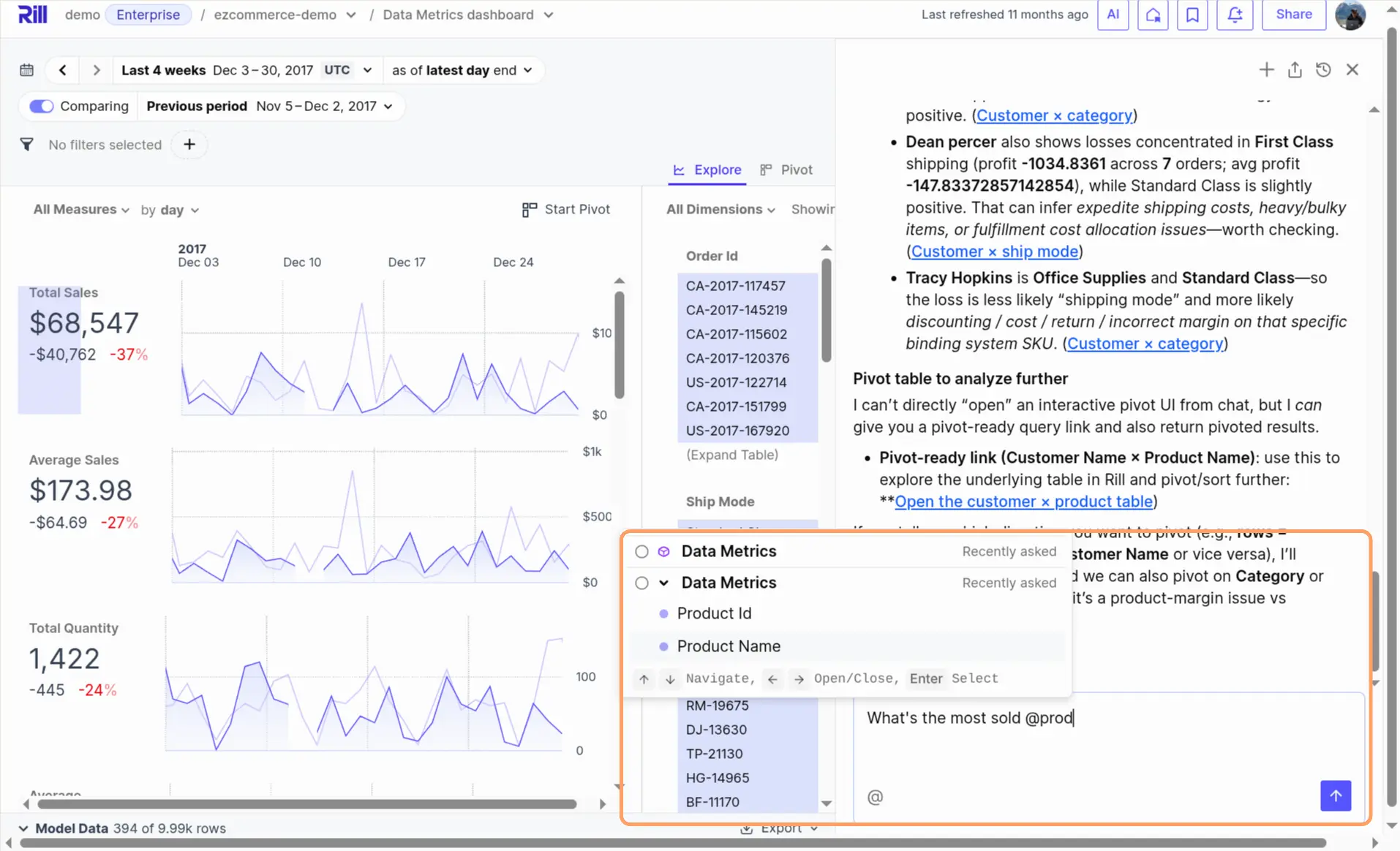
Here's a full video of what you can do with it.
The chat interface provides charts that can be further explored or integrated into your dashboards. What I like most is that in the responses, you can just click on them (e.g. 1.) and it will appear as a pivot table in (2.) where you can dig into more details by adding more dimensions and metrics:
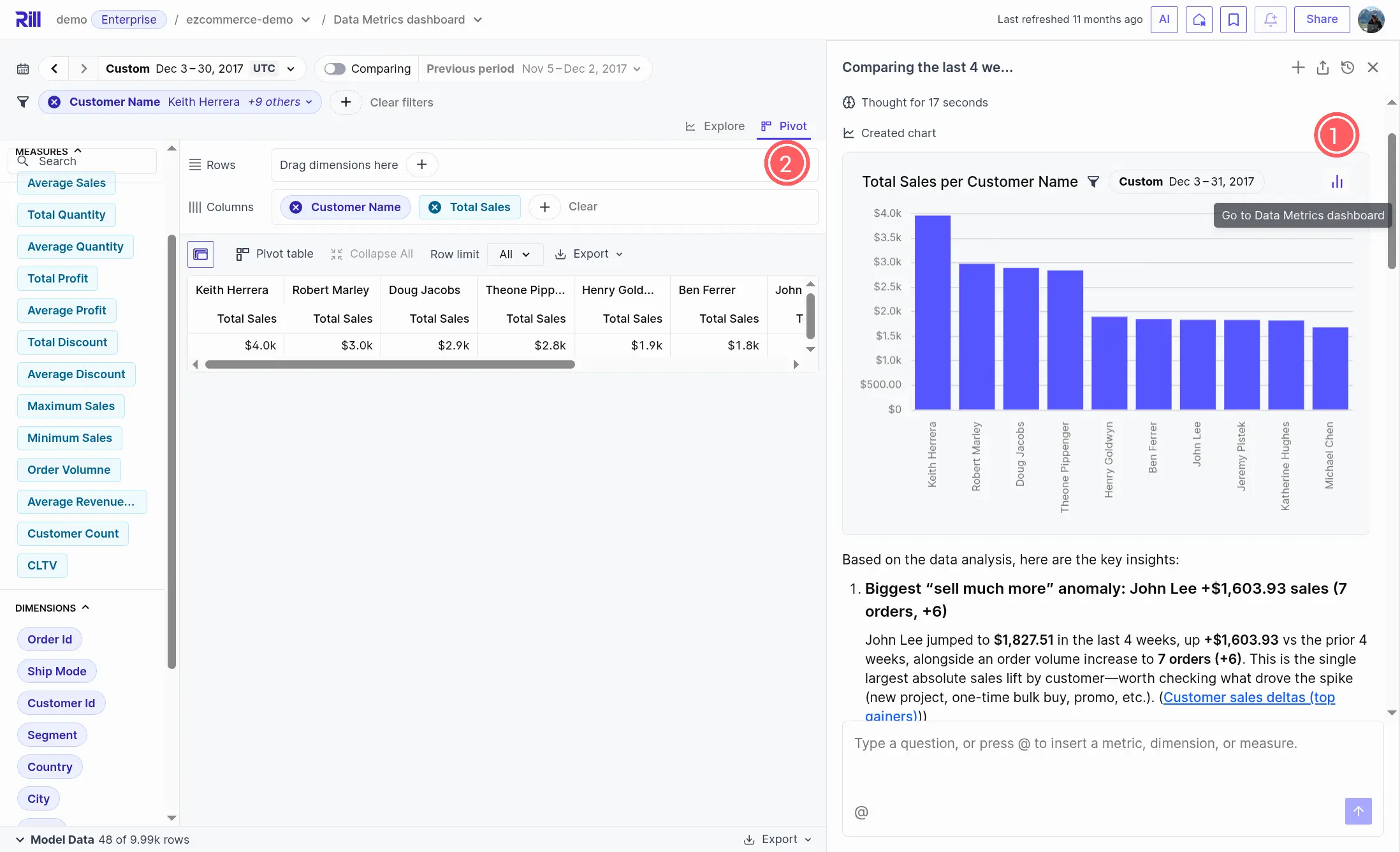
Showcase of how interactive dashboards are created on the fly, to explore and open in a pivot table directly inside Rill. The links are clickable, see a short video of how that looks in action:
You can also use Claude integration with MCP
Rill's MCP can also be used, see Showcase of Rill MCP with Claude Desktop - YouTube. Or Cursor if that is your preferred AI-based IDE at BI-as-Code and the New Era of GenBI Demo - YouTube.
Let's now look at different analytics use cases and implementations with these handy features combined with MotherDuck as the backend.
MotherDuck + Rill in Action: Three Examples
Let's now look at actual implementations with these features combined. We'll start with how to connect Rill to MotherDuck, then walk through two open-source examples you can try yourself, and finish with a real-world customer showcase.
Connecting Rill to MotherDuck
Since Rill already embeds DuckDB, connecting to MotherDuck requires only a four-line YAML connector config with a token and a md: path. Add a motherduck.yaml to your connectors/ folder:
type: connector
driver: duckdb
mode: readwrite
token: "{{ .env.CONNECTOR_MOTHERDUCK_TOKEN }}"
path: "md:my_database"
Compare that to a local DuckDB connector:
type: connector
driver: duckdb
dsn: "my_database.duckdb"
The only difference is token + path: "md:..." instead of dsn. Set the token as an environment variable (see Rill docs for details), and your SQL models, metrics, and dashboards work identically — whether the data lives on your laptop or in MotherDuck's cloud.
In 2025, Rill significantly strengthened its native connectivity to enable zero-copy, blazingly fast analytics without moving data, making this connection even more seamless.
Stack Overflow Developer Survey: Zero-Pipeline Analytics
The simplest way to experience MotherDuck + Rill is with data you already have. Every free MotherDuck account ships with sample_data.stackoverflow_survey.survey_results[2] — 600k+ professional developer responses from 2019-2024. No ETL needed.
The motherduck-rill project builds a complete analytics stack on this data: 4 SQL models (staging, technology usage, developer profiles, database analysis), 3 metrics views with 17+ measures, and 3 canvas dashboards — all as pure SQL + YAML in a Git repo. No Python, no orchestrator, no data pipeline.
git clone https://github.com/sspaeti/motherduck-rill.git && cd motherduck-rill
cp .env.example .env
# Add your MotherDuck token to .env
rill start
# Open http://localhost:9009
That's it. One command and you're exploring which databases are most desired in the US, which languages pay the highest salaries, or how AI adoption shifted across years — all backed by MotherDuck's serverless cloud.
Answering the question of "Which databases are most desired in the US according to Stack Overflow":
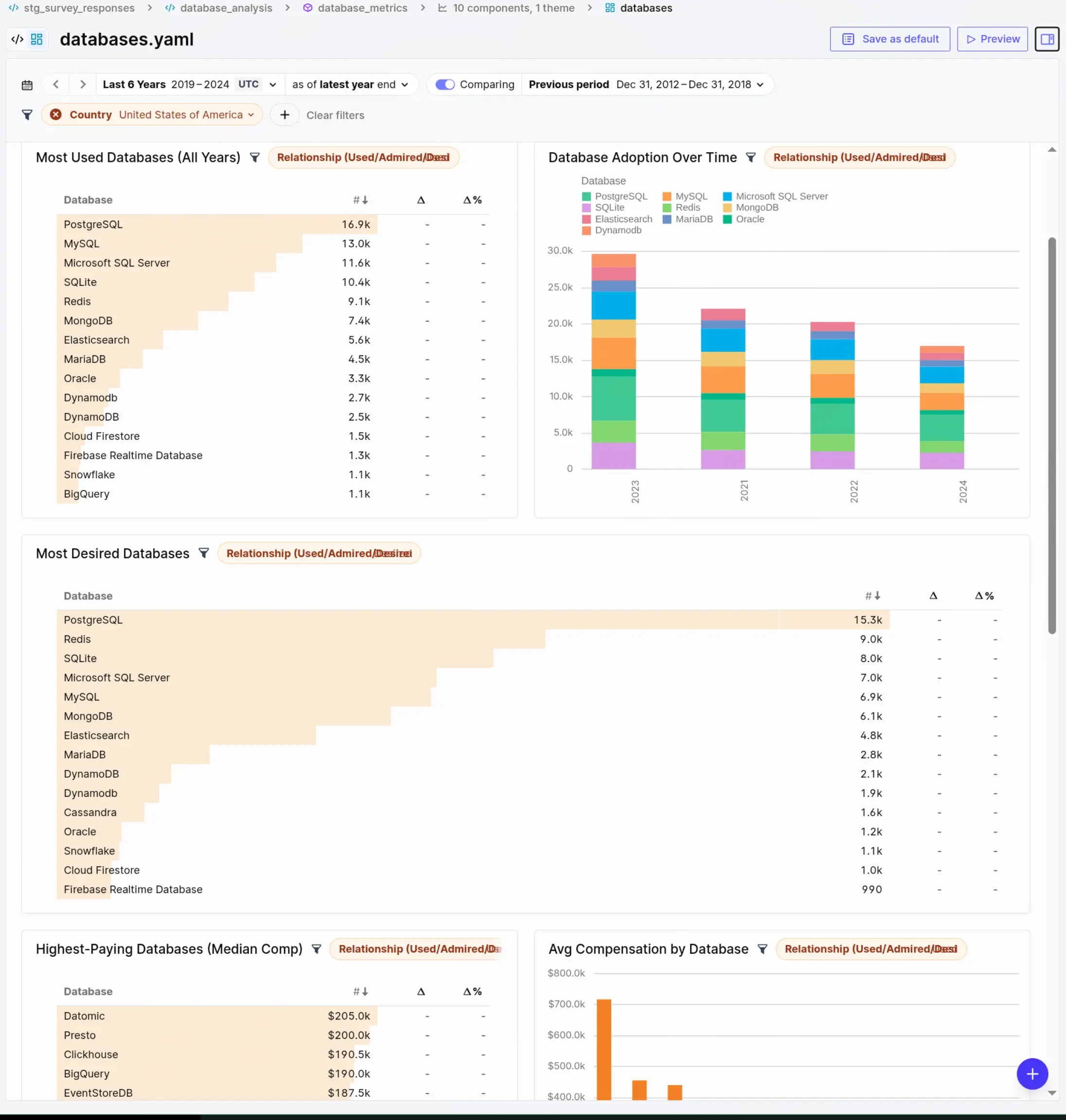
The SQL models use standard DuckDB syntax throughout. For example, the database_analysis model unnests semicolon-separated survey responses into one row per database per relationship type (used, admired, desired), then the metrics view aggregates them with COUNT(DISTINCT ResponseId). The same SQL runs locally via embedded DuckDB or via MotherDuck — the connector config is the only difference. This is what BI-as-Code looks like in practice.
The above example could be created based on a couple of simple prompts, as Rill's definitions are all local and the data accessible through MotherDuck through DuckDB CLI.
Multi-Cloud Cost Analyzer: Production-Grade Connector Switching
For a more production-like setup, I use the cloud-cost-analyzer I've built in a previous edition to visualize your costs from different hyperscalers with ClickHouse, and now added MotherDuck.
This project shows how MotherDuck fits into a real data pipeline alongside local DuckDB and ClickHouse. Same dlt pipelines, same Rill dashboards where I just added a different destination to dlt. Zero pipeline code changes were needed.
The key insight: MotherDuck uses DuckDB SQL syntax, so the SQL models share all functions with local DuckDB. Only the FROM clause differs — read_parquet('...') locally vs schema.table on MotherDuck. The Rill SQL models use a 3-way conditional to switch to work around these small differences between connectors:
{{ if eq .env.RILL_CONNECTOR "motherduck" }}
SELECT CAST(SPLIT_PART(identity_time_interval, 'T', 1) AS DATE) AS date, *
FROM aws_costs.cur_export_test_00001

{{ else if eq .env.RILL_CONNECTOR "clickhouse" }}
SELECT toDate(splitByChar('T', identity_time_interval)[1]) AS date, *
FROM aws_costs___cur_export_test_00001

{{ else }}
SELECT CAST(SPLIT_PART(identity_time_interval, 'T', 1) AS DATE) AS date, *
FROM read_parquet('data/aws_costs/cur_export_test_00001/*.parquet')

{{ end }}
Notice how MotherDuck and local DuckDB share the exact same SQL functions (CAST, SPLIT_PART) — only the FROM source changes. ClickHouse needs its own dialect (toDate, splitByChar). This is the practical advantage of MotherDuck being DuckDB in the cloud: your SQL models stay the same.
git clone git@github.com:ssp-data/cloud-cost-analyzer.git
cd cloud-cost-analyzer
uv sync

# 1. Add your MotherDuck token to .dlt/secrets.toml
#    [destination.motherduck.credentials]
#    password = "eyJ..."

# 2. Add token to viz_rill/.env
#    CONNECTOR_MOTHERDUCK_TOKEN="eyJ..."

# 3. Load data into MotherDuck (same pipelines, different destination)
make run-etl-motherduck

# 4. Start Rill dashboards backed by MotherDuck
make serve-motherduck
Under the hood, DLT_DESTINATION=motherduck tells dlt to write to MotherDuck instead of local parquet files. The same data is then also visible in the MotherDuck web UI for ad-hoc querying alongside the Rill dashboards.

This pattern — make serve-motherduck vs make serve vs make serve-clickhouse — shows what switching from local to cloud looks like in a CLI-first stack.
Driotech: Agentic Analytics in Production
Beyond my own demos, Salomon from Driotech showcased how they use Rill for agentic analytics with client data using MotherDuck in combination with Airbyte, dlt, BigQuery and dbt.
In his webinar on empowering businesses with agentic analytics, he walked through a B2B sales use case that highlights exactly the principles we discussed above.
Video walkthrough with the example of Airbyte/dlt + BigQuery/MotherDuck/dbt + Rill.
His key takeaways align perfectly with the MotherDuck + Rill thesis:
- Metrics as the foundation: Before any AI agent can work reliably, you need clearly defined KPIs and a single source of truth. "If you feed any AI agent with a mess, you're going to end up with an even bigger mess." → This is exactly what Rill's metrics layer provides: versioned, agreed-upon definitions in YAML.
- Governance as guardrails: The agent doesn't hallucinate on business concepts because the semantic model constrains what it can query. When asking "what are our shipping costs?" → The agent looks up the exact metric definition, avoiding guessing from raw data.
- From reactive to proactive: Beyond just answering questions, the demo showed creating alerts ("if customer orders drop to zero in 14 days, email the account manager") and scheduled reports → Pushing insights to stakeholders automatically.
- Code-defined dashboards: Salomon explicitly called out that Rill's code-based approach means "AI agents are able to build the dashboards for us" → Because the language of AI is code, and Rill's dashboards are just that.
The above webinar reinforces a central point we've discussed above that conversational BI can be used today in Rill. When you have a solid semantic foundation (metrics in Rill), a scalable backend (MotherDuck), and a code-first workflow, the agentic layer becomes practical, trustworthy, and something you can deploy to real users today.
What's Next, Dashboards no More?
Seeing these examples, and where we are heading with agentic BI, one might ask now, do we even still need dashboards? We can just ask the chatbot?
I agree with Mike's argument that: "No, well-crafted, and especially operational dashboards, they will never go away". Because a visualization can provide so much more condensed information in a couple of seconds that a chat never will, or would require many back-and-forth chats.
There's also a difference between "a" dashboard and the dashboards. E.g. more than half of dashboards are just exploratory in nature to quickly explore the business or data. Additionally, the sales dashboards that someone spent weeks or months, sometimes years for large companies, to perfect and ensure the correct numbers, deriving key decisions for the business from it or defining a sales rep's salary as how much they sold usually is tracked in a dashboard as well.
One more thing that chatbots can't replace is so-called "drilling down", and using data as a REPL with pivot tables - as they never die. Quickly drilling down to the lowest details and back up to the aggregated data within seconds, simply dragging and dropping dimensions and measures around.
People don't know what they are looking for Benn Stancil argued, "the challenge with data exploration is not that people don't have the ability to manipulate data; it's that they don't know what they're looking for."
Natural Language Interface: Convenient, but Inaccurate?
With agents, we can use natural language as an interface to input domain knowledge, and agents will do the technical translation and implement it in such a code and declarative-first approach, where the context is clearly and distinctly defined - much more than natural language, which contains lots of nuances and ambiguity.
So with that approach, the agent will put it into deterministic YAML, that can then be reviewed, tested and automated against. So we move from Human to agents to context to iteration and finally, visualization:

Similar to what we discussed in GenBI, iterating much faster than with the traditional, non-generative way:

Self-Serve with BI-as-Code providing the Context
So what's next? Are we arriving at self-service BI finally? (the never-ending promise).
Agents with natural language solve a big problem that self-serve always strived for: Giving each domain user who is less technical an edge to do self-serve themselves, and potentially even go further and fix the data by prompting the data pipeline to fix the correct timestamp, or update a dbt model with the right table source.
With domain experts doing more developer work with agents, we can combine domain knowledge with coding abilities of agents, bridged by natural language with BI-as-Code providing the semantic context that includes models, metrics and even dashboards in plain YAML.
Context is king for the near future. Everything that can be locally defined, such as Rill's metrics layer and dashboards, will be so much faster and better built with agents.
But BI is not the only domain noticing this power, Kurt Buhler of Tabular Editor wrote: "CLI tools provide an alternative way to interact with software in a terminal by writing and executing commands. This command-line interface is very suitable for agents."
SQL, YAML: And why Language Choices Matter
Also, with Rill and MotherDuck we choose SQL as our primary language and interface and YAML as structured format to store. And the language choice matters because the training data for widely adopted languages like SQL is larger, thus LLMs are better at generating BI-as-code in SQL than DAX, LookML, or some obscure language.
Wes McKinney even argues that AI agents are enabling him to build software in languages like Go and Swift, despite his lack of prior experience. He says that "human ergonomics in programming languages matters much less now," as agents prioritize fast compile-test cycles and frictionless distribution, favoring languages like Go and Rust over Python for new systems. Interested in more, check the conversation with Wes and Mike.
Limitations
The one limitation for the future of data might be the imprecise way of natural language and how we communicate. For example: "give me the analytics for this week?" Did you mean "from today until last week"? Or "full weeks Monday to Sunday"? Or "starting from midnight, or during the day"? So many unknowns and misinterpretations possible.
The other is that the future of data needs to be deterministic and reproducible, to backfill faulty data, but AI agents are the opposite. And that can be challenging.
Text-Based, Local-First: The Architecture Agents Need
The connectors between source and destination are getting more flexible, more fluid, self-healing. Knowledge workers might soon be able to not only figure out the problem, but also act on it directly: "send an email to…" to fix the problem.
As the examples in this article show, we've come a long way with Self-Serve BI, and we might already be there. Keep in mind the three pillars: semantics, stewardship, speed as you work in the Agentic Era.
The MotherDuck + Rill story is ultimately about the data industry discovering that the tools best suited for AI agents are the same tools that respect simplicity, transparency, and developer ergonomics.
The "small data" thesis didn't anticipate the AI agent revolution, but it created the conditions for it: when your data fits on a laptop and your dashboards are YAML files, an AI agent can read, reason about, and act on your entire analytics stack.
The irony is that going back to local-first, text-based, SQL-defined analytics turns out to be the most forward-looking architecture. And dashboards become agents when they're written as code.
---
If any of these interest you more, also check out related articles around conversational BI, BI as code, and how AI can self-serve us in the world of BI:
- BI-as-Code and the New Era of GenBI
- Data Modeling for the Agentic Era: Semantics, Speed, and Stewardship
- Has Self-Serve BI Finally Arrived Thanks to AI?
- GenBI - one-click dashboards with generative AI and BI-as-code
[^1]: See Redshift Files
[^2]: If you don't see the sample_data database, your account may predate the sample data being added
.jpg)
.svg)

.jpg)

Ready for faster dashboards?
Try for free today.