
Rill’s Agentic Architecture: Analytics for the AI Era


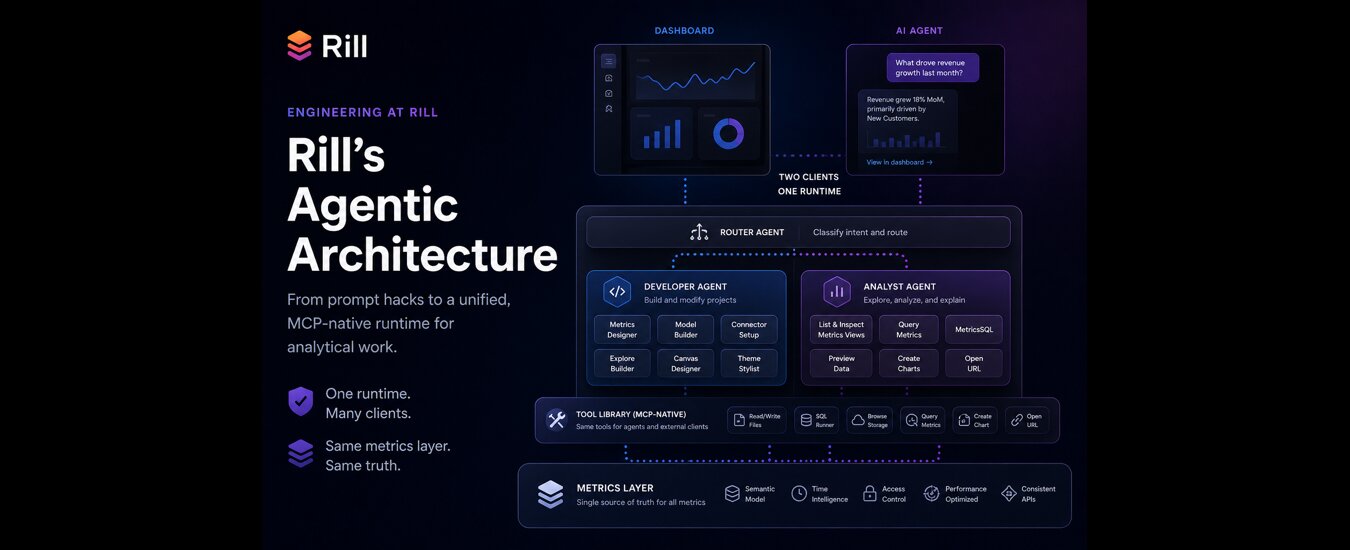
Most BI tools are adding LLMs to interfaces built for clicks. At Rill, we chose a different path: build one runtime, expose it through one tool surface, and treat the dashboard and the agent as two clients of the same metrics layer. That decision shaped everything that followed.
This post is a summary of how Rill’s AI system evolved from a handful of one-shot prompts into a cohesive, MCP-native runtime for analytical work.
Where we started: prompts that worked, but did not scale
The first AI feature that we shipped in February 2024 was simple: a dashboard generator. Given a model’s column schema, it produced a useful metrics view definition. The prompt was about eighty lines, hand-tuned, and surprisingly effective.
Then, within a month, we had the predictable problem:
- Multiple prompts, each owning a slice of the workflow
- No shared intelligence or state between prompts
- Rill resource schema knowledge duplicated across prompts, parser code, and docs
- Drift every time one of those changed
Each prompt was locally useful and globally messy. The issue was not that prompts were bad, it was that they were hard to maintain and scale. We needed a different architecture.
The shift: from prompts to a multi-agent architecture
We took inspiration from Anthropic's Building Effective AI Agents and redesigned the system around a layered agent architecture.
The goal was not to create a single giant agent that knew everything; that was the trap we wanted to avoid. Instead, we built a runtime where agents could specialize, delegate, and share access to the same underlying tools.
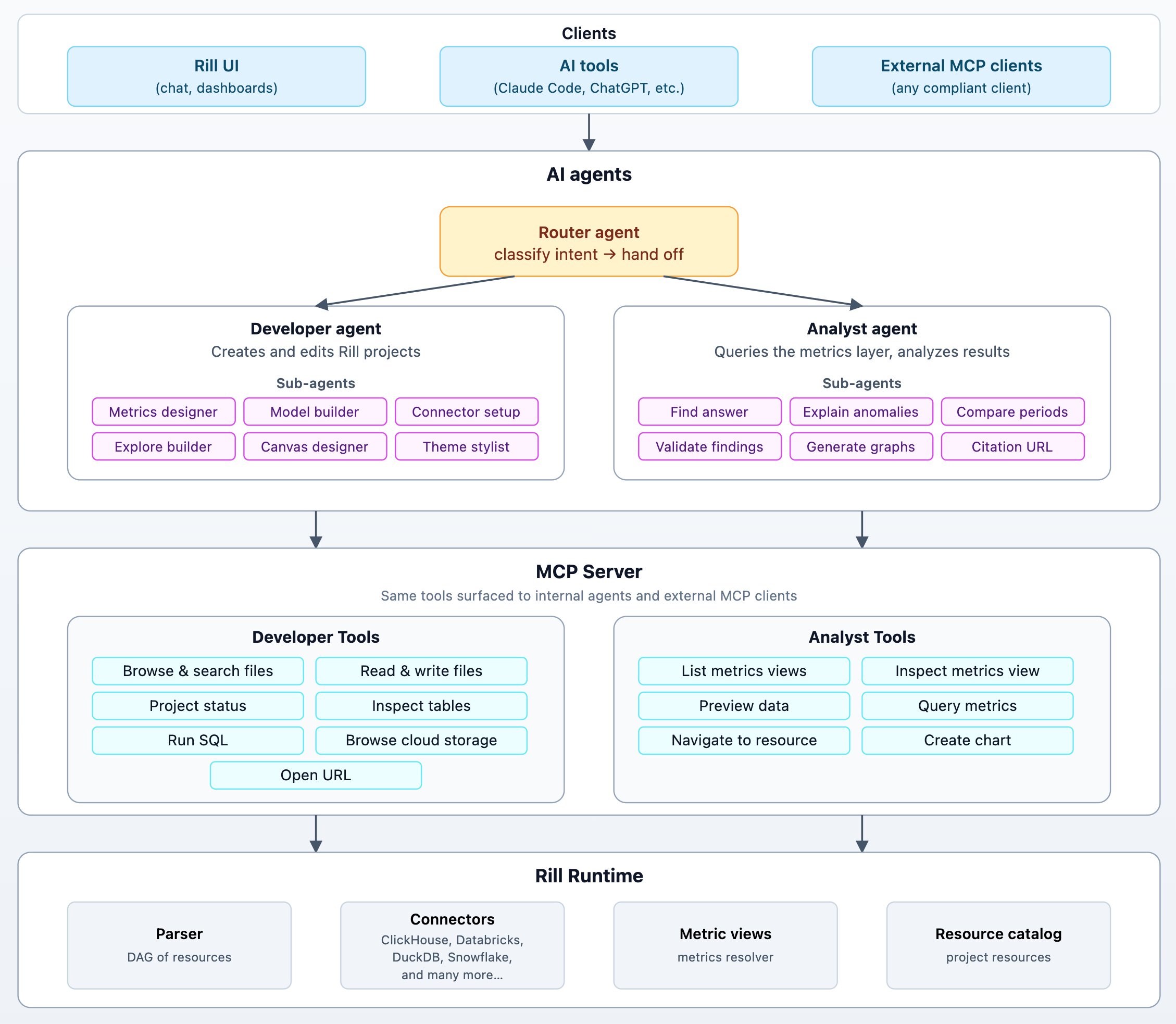
At a high level, Rill’s agent system has:
- A small router agent that classifies intent and routes the request
- Two specialist agents: a Developer agent and an Analyst agent
- Focused sub-agents for resource-specific work
- A shared tool library exposed through the same MCP surface used by external clients
The important design choice is that all agents share a runtime, not a prompt. The Developer agent and Analyst agent have different system prompts, workflows, and sub-agents. But underneath, agents are just new clients, alongside UI and CLI, of the same core platform.
Designed for both humans and agents
Before going deeper into the architecture, it’s worth calling out the constraint that shaped all of it. Rill is not building a parallel “AI answer engine” next to the dashboard.
AI agents and humans operate on the same foundation.
That decision has concrete consequences:
- The URL an agent cites is the same URL a human opens
- The metrics layer remains the contract: dimensions and measures are defined once and queried by dashboards, SQL users, MCP clients, and internal agents
- Performance improvements benefit every client
- Authorization works the same everywhere
This is what headless BI was always supposed to enable: one semantic layer, many clients, no duplicated logic.
Everything that follows — agents, tools, MCP — exists to preserve this property.
Router agent: simple but useful dispatching
The Router does not try to solve the problem. The router’s job is simple: Understand enough to dispatch work to the right agent. We accept the cost of one extra hop because the alternative is a mega-prompt that tries to understand every possible workflow. Those systems become hard to debug, hard to evaluate, and hard to evolve.
Developer agent: declarative work, observable state
The Developer agent's job is to edit a project and bring a project to a desired state. The user says "set up a dashboard based on the orders table in Snowflake"; the agent makes changes in a tight loop until the project's resource graph reconciles cleanly.
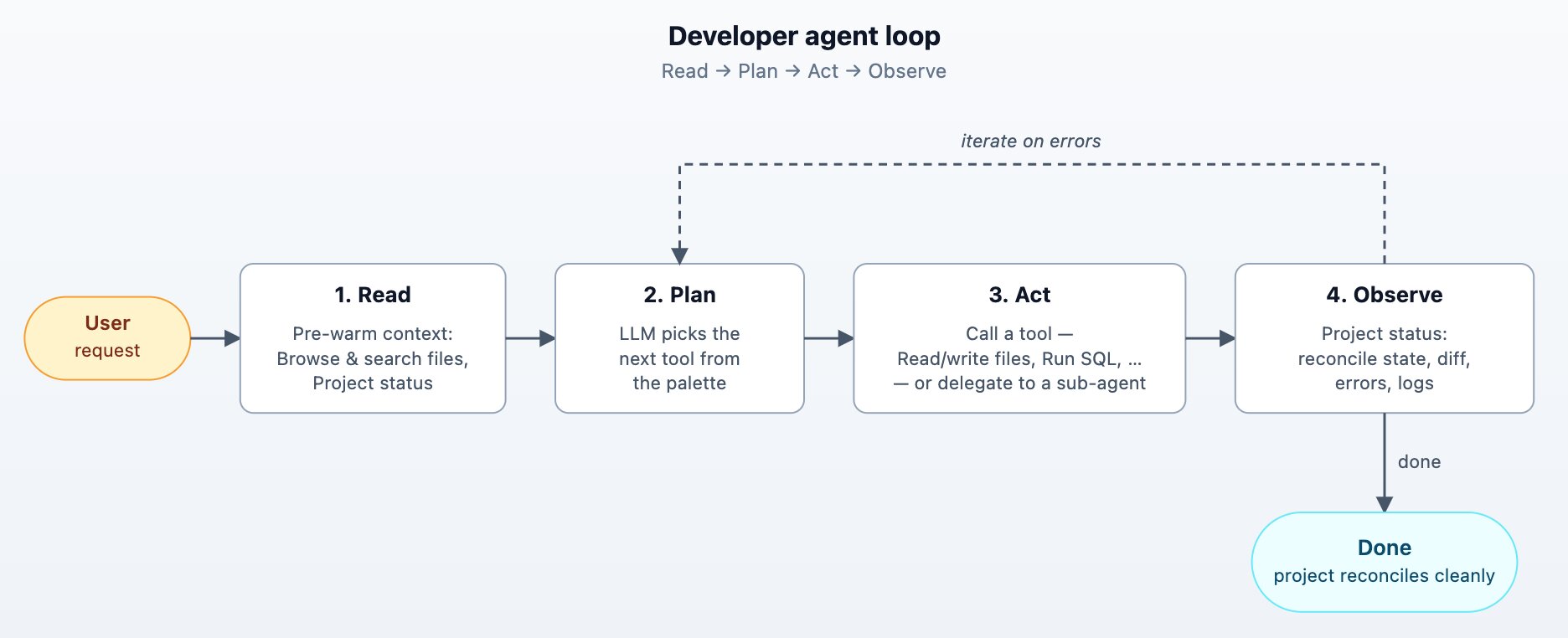
Agent loops are a great fit since Rill projects are declarative. Every project edit provides the agent with project status returning the reconcile state, parse errors, runtime errors, and (optionally) recent logs for any specific resource. The agent reads, edits, observes, repeats in a tight loop.
When the Developer agent decides to create or edit a specific resource type, it doesn't write the resource inline, it hands off to a focused sub-agent. There's one per resource kind: Metrics designer, Model builder, Connector setup, Explore builder, Canvas designer, and Theme stylist.
Each sub-agent has its own system prompt drawn from the resource-specific skill , a curated set of tools, and the JSON Schema for that exact resource. The outer developer agent stays at the project level.
The Developer agent has access to tools that allow it to:
- List and search files: allows agent to look through existing project files
- Read files: keep the agent in sync with the project files
- Write file: The write tool returns a unified diff plus the new reconcile status — no separate "did it work?" call.
- Project status: reports the reconcile state, parse errors, and runtime errors after any edit.
- Inspect tables and Run SQL: let the agent look at the OLAP database engine before writing a model or metrics view, so it doesn't have to guess column names.
- Browse cloud storage: covers the "data lives in S3 → I know what's there" path.
- Open URL: navigates the user to a specific resource for verification.
Analyst agent: structured interrogation over a metrics layer
The Analyst agent explores data, builds a story, and cites every claim back to the query that produced it. It can answer questions, explain anomalies, compare periods, validate findings, and generate charts. Most runs blend several of these tasks.

The analyst workflow is best understood as a constrained OODA loop:
- Discover what metrics and dimensions exist
- Query the metrics layer
- Interpret the result
- Ask a sharper follow-up question
- Repeat until the answer is supported
The key constraint is that the Analyst agent does not write arbitrary SQL against raw tables by default. It queries Rill’s metrics layer. This constraint is one of the biggest reasons the agent stay grounded. Measures, dimensions, time ranges, filters, comparisons, and access policies are already defined in the system. The agent works through that contract instead of inventing one.
The Analyst agent has tools to:
- List and inspect metrics views
- Inspect data stats and sample values
- Query metrics - using structured API or MetricsSQL when SQL ergonomics help
- Create chart components using Vega Spec
- Open and navigate to the relevant dashboards
Tools as a contract: the MCP-native runtime
We treat tools like public APIs with a contract and not helper functions. The same set of tools are available to Rill’s agents and at the same time exposed to external AI tools via MCP server. While building these tools, we have relied on a few design principles:
- Schema-validated inputs. Every tool input is generated from a typed struct with JSON Schema annotations. The model gets useful type information, and the runtime gets validation.
- Bounded outputs. Large query results are paginated with next page information added in result so the LLM knows it didn’t get the full picture. We would rather force the agent to ask a follow-up question than flood the context window with irrelevant rows.
- Permission-aware exposure. A tool is registered only if the caller is allowed to use it. It also saves instructions and avoids the agent getting confused – easier to remove the tools than explain to the AI that it can’t use them.
- Same tools, externally. The MCP server exposes the same analyst tools to compliant clients like Claude Code, Cursor, or custom agents. Internal and external agents use the same handlers and the same access checks.
The above design choices had a huge payoff:
One place to fix bugs, one place to add capabilities, and one consistent interface for humans, dashboards, agents, and external clients.
Keeping agent skills in sync
In addition to internal agents and MCP tools, we provide Rill agent skills for tools like Claude, Cursor, and Codex. Skills are powerful, but they introduce a familiar problem: drift. If the internal agent prompt says one thing, the external skill says another, and the code supports something else, users get inconsistent behavior.
We addressed this by making every part of the system point back to a clear source of truth.
The pattern is simple:
- Resource definitions live in typed structs
- The parser generates JSON Schema from those structs
- Narrative guidance lives in Markdown
- Internal agents and external skills use the same Markdown files
- A templating directive inlines the live schema into the skill at build time
The Markdown is still hand-edited, because good operating guidance needs judgment. But it is not duplicated. The schema comes from code, and the same playbooks are shared across internal agents and external tools.
Context engineering: where speed and reliability come from
Most of our AI related performance improvements did not come from clever prompts. They came from context discipline. Some techniques that worked well for us:
Pre-warm tool calls
If you know what the agent will need first, put it there yourself. It reduces wasted iterations, improves time-to-first-token, and helps prompt caching across loops.
The Developer agent starts with project status and file search before the model is asked to reason. The Analyst agent, when launched from a known dashboard context, preloads metrics view inspection and data previews.
Bound iterations with a cap
Agents always run with an iteration cap. The final iteration is special: tools are stripped from the request, forcing the model to produce an answer instead of looping forever. This is a guardrail, not the happy path. In practice, the agent usually finishes before the cap.
Compact context
Long conversations accumulate noise. We keep the first few messages, preserve the latest turns, prune orphaned tool calls, and compact the middle into a high-signal summary. The goal is not to preserve every token. The goal is to preserve the facts that affect the next decision.
Use citations as a reasoning constraint
Citations are usually treated as an output requirement. For analytics, they are more than that. They also shape the reasoning process. If the agent must cite every number, it must keep the query and result in working memory through synthesis. If it cannot cite a claim, it has lost the trail and should run another query. This prevents a lot of confident nonsense and reduce hallucinations.
Enable personalization at the project-level
Project administrators can define ai_instructions at project and resource level. Those instructions flow into the agent as project-scoped guidance: “Financial year stats on Feb 1.” “Use booking date, not event date, for sales reporting.” This gives domain experts a clean way to inject context the agent cannot infer from schema alone.
Eval harness: golden completions, not vibes
You cannot iterate on agents without evaluation. Agent behavior is non-stationary. A small prompt change, tool description update, or model swap can improve one workflow and break another.
Our eval harness freezes scenarios as two YAML files:
- One captures the conversation and tool results
- The other captures the expected completions
Evals cover issues such as router classification, dashboard analysis, canvas analysis, broken metrics views, S3 introspection, ClickHouse playgrounds, developer workflows, and feedback attribution.
We also run a feedback attribution agent for AI conversations. When a user gives a thumbs-down, the system classifies the cause:
- Rill: the AI failed
- Project: the data or project setup did not support the request
- User: the question was ambiguous
Negative feedback becomes useful telemetry for us to improve and fine tune our agents further.
Lessons for analytics teams building agents
If you're designing an agent stack for analytics inside your company, the patterns that paid off most for us:
- Use a metrics layer and avoid hallucinations. The single biggest reason our agent doesn't hallucinate is that it doesn't get to write SQL against raw tables. It queries a typed metrics layer. If you don't have one, build one before you build the agent.
- Make the agent's tools your product surface. Expose the same tools internally and externally over MCP. You get one place to fix bugs, one place to add capabilities, and a free integration story.
- Bound everything. Bound queries, bound iterations, bound output rows, bound tool inventories.
- Enforce citations. A claim without fact is a guess. The output format polices the reasoning more effectively than any system-prompt tweaks.
- Pre-warm obvious context. Don't make the agent rediscover what your code already knows. Seed the context, then let it reason.
- Build the eval before the second feature. You cannot iterate on what you cannot measure. Start with golden conversations and grow from there.
- Stay declarative where you can. The agent's job is dramatically easier when the system can answer "did that work?" without the agent having to imagine.

.svg)



Ready for faster dashboards?
Try for free today.